Touchscreen menu configurator for commercial coffee machines
A configurator that lets coffee equipment dealers design a machine's touchscreen menu, preview it on a simulated screen, and export a manufacturing-ready spec in one click.
Figures measured directly from the project repository.
A commercial coffee machine is not a commodity. When a dealer sells an EGRO Next to a café chain, the machine arrives with a bespoke touchscreen menu: which drinks appear, what they’re called, which icon represents each one, what order the buttons sit in, which bean hopper and milk system each drink draws from, and what plays on screen when the machine is idle.
Specifying that used to happen over email. A dealer would describe the menu in a message or a spreadsheet, attach a logo and a video, and send it on. What arrived at the factory was frequently unbuildable — a drink referencing a hopper the machine doesn’t have, an idle-screen video in the wrong aspect ratio or codec, an icon set that didn’t cover every drink. Each error meant another round trip, and the round trips happened late, when the machine was already in the build queue.
The underlying issue is that the person configuring the menu had no way to see what they were configuring, and no way to know their inputs were valid until someone downstream told them they weren’t.
A self-serve configurator for EGRO’s dealer network, covering the full path from a blank configuration to a package the factory can build from.
The platform supports two machines in the EGRO Next line — Next Top Milk and Next Touch Coffee — and they are genuinely different products, not variants behind a flag. Each has its own configurator, its own available-options set, its own coffee and drink models, and its own exporter. Shared behaviour lives in traits and an abstract exporter; everything that actually differs between the machines is expressed as difference rather than smoothed over with conditionals.
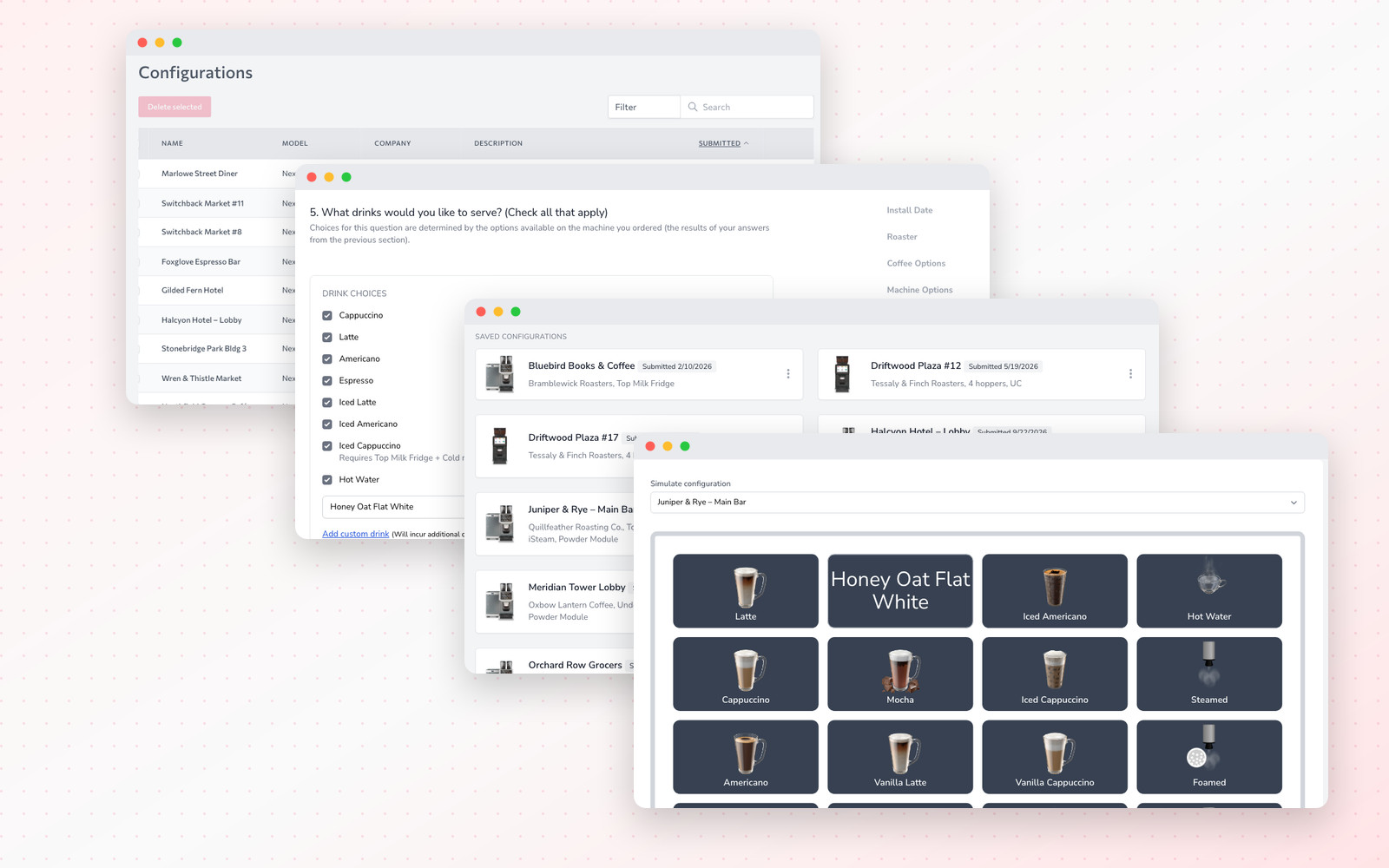
Dealers configure blends, hoppers, drinks, and icons, with an available-options model constraining choices to what the selected machine can physically do. Button layout is arranged by dragging — priority values behind the scenes, direct manipulation in front of them.
The idle-screen video was the single most common source of rejected specs, so we stopped trusting the upload. Every submitted screensaver is inspected with ffprobe at validation time: the file is probed for its stream list, rejected if it contains no video stream, and checked against the required codec, aspect ratio, and size ceiling for the target machine. A dealer learns their video is wrong in the browser, seconds after choosing it, rather than a fortnight later from a production engineer.
The feature that changed the product is the simulator: a live rendering of the machine’s touchscreen driven by the configuration the dealer just built. They select a configuration and see the actual screen — the icons, the drink names, the button order, the idle graphic — as the machine will present it.
This is what closed the comprehension gap. Configuring a menu stopped being an act of describing something and became an act of looking at it. Dealers can also submit directly from the simulator, which is the natural place to do it: you approve what you can see.
Submission produces a package rather than a message. The exporter assembles a Word document containing the submitter’s details and the full machine specification, gathers the associated media — icons, wallpaper, screensaver — and bundles everything into a zip named for the dealer’s company and contact. If there’s only a single file it streams that directly; otherwise the archive is built, streamed, and the working directory cleaned up behind it.
The factory receives one file containing a spec it can read and assets it can use, both derived from the same validated configuration.
The abstract Exporter was the key structural decision. Document generation is the kind of code that rots fastest — it accretes special cases until nobody will touch it. Putting the shared document skeleton in a base class and requiring each machine to implement only addMachineInfo and saveAttachments meant adding the second machine family was a contained piece of work rather than a rewrite of the first.
The same instinct shaped the media validation. Rather than a size-and-extension check, the prober is a small isolated service behind a facade, which made it straightforward to test and meant the validation rules could tighten as EGRO’s requirements firmed up without touching the upload components.
Two engineers built the platform over two years, on Laravel with Livewire and Alpine — a stack that let a small team ship a highly interactive interface without standing up a separate front-end application and the coordination cost that comes with it.
Development concluded at the end of 2022. The configurator is presented here as a completed engagement, delivered from first commit through to the export pipeline the factory worked from.
The system as it actually runs in production.
Whether you have a fully-formed spec or just an idea on a napkin, we'll help you turn it into a product your users love.
